Log in at hotmail.com using your email address and password.
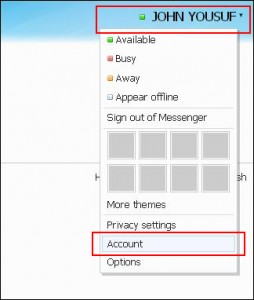
Click on your Name on the top right of the hotmail page after you are logged in. This is marked at down arrow. Click ‘Account’ link on the drop down list. This will redirect you to the account options page.
‘Close your account’ link is located under ‘Other Options’ at the bottom of the page. Click it, and you will be redirected to the Account Deleted Page.
Hotmail deleted will ask your to confirm the deletion by entering your current password. Enter it and your account will be gone.
Warning 1: Do Not delete your account if you ever like to open it again.
Warning 2: Deleting your account will permenantly delete your emails, contact list, and other information.


/https%3A%2F%2Fwww.justanswer.com%2Fuploads%2Fjeydee%2F2008-05-23_111403_5.gif)
/https%3A%2F%2Fekladata.com%2FhxvbHJ-X5WMi53BXX-oZnYe8Mto%40500x262.jpg)
/http%3A%2F%2Fworldabcnews.com%2Fwp-content%2Fuploads%2F2018%2F08%2F1006471-696x413.jpg)
/https%3A%2F%2Fassets.over-blog.com%2Ft%2Fcedistic%2Fcamera.png)